terminal Console
The bimrocket platform currently offers the following applications:
-
A web application for the visualization, management, and analysis of IFC models, which can be deployed on a Jakarta web server or run independently on a Quarkus execution environment. This application has two parts: a frontend that implements the user interface and a backend that implements the data management and persistence services.
-
A console application for advanced manipulation of IFC files.
This section describes the uses and operation of the console application.
Uses
The console application (bimrocket-console) is especially suitable for the following use cases:
- Introspection of IFC files (for example, searching for elements that meet a certain condition).
- Extraction of a subset of elements from an IFC file.
- Purging unreferenced objects from an IFC file.
- Renaming and changing the value of properties within the IfcPropertySet elements of an IFC file.
Installation
To install the console application, follow these steps:
- Download the latest version of the bimrocket-console-*.zip file from https://github.com/bimrocket/bimrocket/releases.
- Decompress the downloaded ZIP file into a local directory.
- Open a system terminal in that directory and run the script:
./bimrocket-console.sh(Unix) or.\bimrocket-console.cmd(Windows). - After a few seconds, the application will be ready for use:
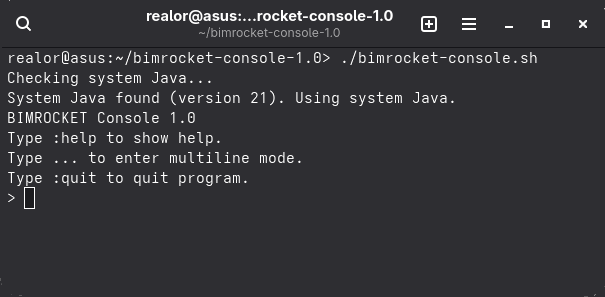
Operation
The console offers two operating modes:
- Interactive mode: allows you to execute commands step-by-step and see the result immediately. This is the default operating mode.
- Batch mode: allows you to execute a sequence of commands stored in a file all at once.
This mode is activated if you pass the name of the file to be executed as an argument when invoking the application from the terminal:
.\bimrocket-console.cmd script.js.
Most of the commands offered by the console are expressed in the JavaScript programming language and
follow the format command(arg1, arg2, ...), although there are two special commands that have a different syntax:
:helpshows the help documentation for all supported commands.:quitterminates the application and returns to the operating system terminal.
In interactive mode, you can execute a command using a simplified syntax where
it is not necessary to type parentheses, commas, or quotation marks.
For example, the following command: addPsetRule("ASF_Geometria", "ASF_Volum", "CAT_Volum")
could be launched like this: addPsetRule ASF_Geometria ASF_Volum CAT_Volum.
When using the simplified syntax, it is not possible to reference variables or functions.
The console also supports any valid Javascript expression.
Branches of a model
A IFC model is loaded by invoking the loadIFC command:
> loadIFC("/home/realor/model.ifc")
Loading from /home/realor/model.ifc (2,45 MB)...
Load completed in 1.001 seconds.
This command loads all objects from the IFC file into the "main" branch, where a branch can be seen as a list of IFC objects.
For the same model, we can create different branches, where each of them can contain a different selection of model objects.
As long as a model is loaded, there will always exist:
- A current branch.
- A cursor pointing to an object in the current branch.
Most bimrocket-console commands operate on the current branch or cursor.
The current branch can be queried by invoking the branches command:
> branches
branches()
main
walls (current)
roots
This command shows all existing branches and which one is current.
We can see which object the current cursor is pointing to using the list command:
> list
list()
  #13410 IfcWallStandardCase:
  [0] GlobalId: 3rPX_Juz59peXXY6wDJl18
  [1] OwnerHistory: IfcOwnerHistory[...]
  [2] Name: Wand-Ext-ERDG-1
  [3] Description: null
  [4] ObjectType: null
  [5] ObjectPlacement: IfcLocalPlacement[...]
  [6] Representation: IfcProductDefinitionShape[...]
  [7] Tag: BEF1E630-DE4B-41C5-AD-66-B87F1A8D67A1
  [8] PredefinedType: null
...
If the cursor points to an entity it will show its attributes, and if it points to a collection, the elements it contains.
We can move the cursor to one of the inner objects using the enter(<index>) or enter(<attribute>) command:
> enter 5
> list
list()
#13386 IfcLocalPlacement:
  [0] PlacementRelTo: IfcLocalPlacement[...]
  [1] RelativePlacement: IfcAxis2Placement3D[...]
To move the cursor to the parent object, use the exit() command.
We can search for objects matching a certain condition using the find command:
> find(e => e.isWall("IfcWindow") && e.get("OverallWidth") > 2, "walls")
Matches found: 4
Current branch is walls
This command adds to the indicated branch, walls, all objects from the current branch that meet the specified condition
(walls wider than 2 metres).
If the branch does not exist, it creates it and makes it current.
We can switch branches using the branch command:
> branch main
branch("main")
current branch is main
This command positions the cursor on the top-level list of the indicated branch.
It is possible to see how many objects exist of each type, starting from the current cursor, using the histogram command:
> histogram
histogram()
Entities found: 44249
IfcAnnotation: 14
IfcApplication: 1
IfcArbitraryClosedProfileDef: 22
IfcAxis2Placement2D: 94
IfcAxis2Placement3D: 364
...
Examples
This would be the sequence of commands to extract walls (IfcWall) from an IFC file:
> loadIFC("/home/realor/model.ifc")
Loading from /home/realor/model.ifc (2,45 MB)...
Load completed in 1.001 seconds.
> find(e => e.is("IfcWall"))
Matches found: 13
Current branch is output
> exportIFC("/home/realor/walls.ifc")
Exporting to /home/realor/walls.ifc...
Export completed in 0.033 seconds.
To change the names of the properties in an IfcPropertySet, we could use these commands:
> loadIFC("/home/realor/model.ifc")
Loading from /home/realor/model.ifc (2,45 MB)...
Load completed in 1.001 seconds.
> addPsetRule("ASF_Geometria", "ASF_Volum", "CAT_Volum")
> addPsetRule("ASF_Geometria", "ASF_Perimetre", "CAT_Perimetre")
> addPsetRule("ASF_Geometria", "ASF_Alçada", "CAT_Alçada")
> transformPsets()
...
> exportIFC("/home/realor/model_cat.ifc")
Exporting to /home/realor/model_cat.ifc...
Export completed in 0.824 seconds.
The following Javascript program can be run in batch mode to transform the IfcPropertySet properties of all IFC files contained in a given directory:
const inputDir = "/home/realor/Descargas/";
const outputDir = "/home/realor/output_ifc/";

addPsetRule("ASF_Geometria", "ASF_Volum", "CAT_Volum");
addPsetRule("ASF_Geometria", "ASF_Perimetre", "CAT_Perimetre");
addPsetRule("ASF_Geometria", "ASF_Alçada", "CAT_Alçada");

const files = paths(inputDir, "*.ifc");
for (let file of files)
{
  console.info("---------------------");
  try
  {
    loadIFC(inputDir + file);
    transformPsets();
    exportIFC(outputDir + file);
  }
  catch (ex)
  {
    console.error(ex);
  }
}